
The Reports page gathers TimeLeaf's reports in one place: pick a report, set its filters, read the totals, chart and table, and export it. The Leave Register is on every plan; most other reports need the Professional plan and above.
Open a report
Open Reports
Open the user menu (your name, top right) and choose Reports.
Pick a report
Choose it from the Report menu. The list only includes the reports your role and plan allow. If none are available, the page says so.
Set the filters
Each report has its own filters, such as a date range, a status or a leave type. The results update when you change them.
Read or export
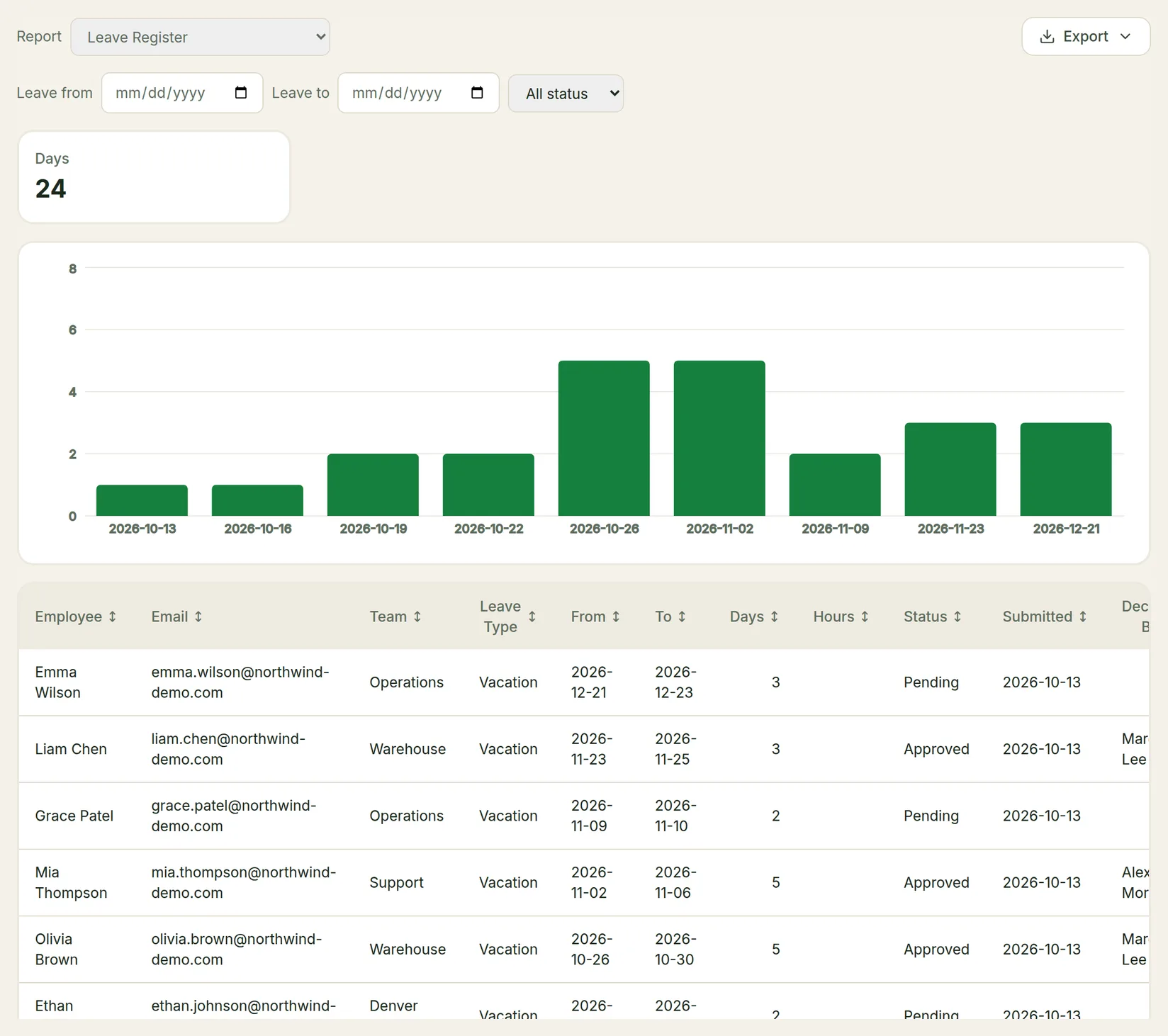
Totals and, for some reports, a chart sit above the table. Click a column heading to sort by it. To download the report, click Export and choose CSV, Excel (.xlsx) or PDF. The export uses the filters you set.
A single report can contain up to 50,000 rows. If yours would be larger, narrow the filters.
Who sees what
| Role | Sees |
|---|---|
| Admins and owners | Every report available on your plan, for the whole company. |
| Managers | The manager-level reports, for themselves and their direct reports. |
| Employees | Their own Absence Summary, Leave Balance Statement and Time Bank Ledger (Professional plan and above). |
Some reports are admins only, as marked below.
Leave reports
| Report | What it shows | Plan | Who |
|---|---|---|---|
| Leave Register | One row per leave request: employee, team, leave type, dates, days and hours, status, when it was submitted, and who decided it and when. Filter by leave dates and status. | Every plan | Managers and admins |
| Absence Summary | Days and hours taken per employee per leave type over a period, split paid and unpaid. Counts approved leave by default. | Professional+ | Everyone |
| Leave Balance Statement | Each employee's entitlement, carryover, adjustments, leave taken, pending and remaining, as of a date. | Professional+ | Everyone |
| Leave Liability | Accrued but untaken paid leave per employee, valued where a pay rate is on file. For month-end finance. | Professional+ | Managers and admins |
| Carryover & Expiry Forecast | Who will carry over or lose leave at the end of the leave year, how much, and when carried days expire. | Professional+ | Managers and admins |
| Bradford Factor | The Bradford Factor absence score per employee: frequent short absences score much higher than one long one. | Professional+ | Managers and admins |
| Approval SLA | How long each approver takes to decide leave requests, and how many are still waiting. | Professional+ | Managers and admins |
| Unanswered Requests | Every leave request nobody decided before the leave ended, with what the timesheet showed. | Professional+ | Managers and admins |
People reports
| Report | What it shows | Plan | Who |
|---|---|---|---|
| Headcount | Headcount and FTE on a date, grouped by the dimension you choose. | Professional+ | Managers and admins |
| Turnover by Team | Leavers as a percentage of average headcount, per team, over a period. | Professional+ | Managers and admins |
| Org Roster | An exportable employee directory: job title, department, team, location, manager, contract and hire date. Can also list people with no manager. | Professional+ | Managers and admins |
| Joiners & Leavers | Everyone who joined or left in a period, one row per event. | Professional+ | Admins |
| Position History | Promotions, moves and pay changes, one row per recorded change. | Professional+ | Admins |
| Contract Expiry Pipeline | Contracts ending soon, and the date by which notice has to be given. | Professional+ | Admins |
| Probation End | Probation periods coming to an end, so a decision isn't missed. | Professional+ | Admins |
| Contract Signature Status | Contracts not yet fully signed, and whether you're waiting on the employee or the company. | Professional+ | Admins |
Time and scheduling reports
| Report | What it shows | Plan | Who |
|---|---|---|---|
| Hours Summary | Regular hours, overtime and leave per employee per work period. | Professional+ | Managers and admins |
| Timesheet Exceptions | Everything standing between you and closing payroll: missing or unsubmitted timesheets, open clock-ins, zero-hour days and scheduled shifts not worked. | Professional+ | Managers and admins |
| Scheduled vs Worked Variance | Rostered hours against hours actually worked, per employee. | Professional+ | Managers and admins |
Overtime and time bank reports
| Report | What it shows | Plan | Who |
|---|---|---|---|
| Overtime Cost | Overtime per team per work period, split into what was banked and what has to be paid. | Professional+ | Admins |
| Overtime Distribution Fairness | Who was offered overtime, who took it, and how many hours each person got. | Professional+ | Managers and admins |
| Overtime Offer Response & Fill | For each overtime opportunity: whether it filled, how fast people answered, and how long it took. | Professional+ | Managers and admins |
| Time Bank Ledger | Every banked-hours transaction: accruals, time taken, payouts and expiries. | Professional+ | Everyone |
| Time Bank Expiry Forecast | Banked hours that are about to expire, whose they are and when. | Professional+ | Managers and admins |
| Time Bank Payout Pipeline | Every time bank payout from request to payment, showing who requested and who signed it off. | Professional+ | Admins |
The overtime offer reports have data only if you use overtime broadcasting, and the time bank reports only if you use the time bank. See Overtime & Time Bank.
Billing reports
These need the Client Invoicing add-on. See Invoicing.
| Report | What it shows | Who |
|---|---|---|
| Billable Hours | Hours per client, site, employee and day, with the billed hours, rate and amount, before any invoice exists. | Managers and admins |
| Billing Exceptions | Hours that changed after they were billed on an issued invoice. | Managers and admins |
Other exports
Some pages have their own exports too: managers can export their team's leave list as CSV from Team Reports, and admins export approved hours and leave for payroll from the payroll export. See Payroll Integration.