Page whoever’s up. Never whoever’s off.
Run the rotation, take alerts from your monitoring tools by webhook or email, and page the person who is up and allowed to work. TimeLeaf already knows who is on approved leave and who has hit their overtime cap, so it skips them and pages the next name instead.
On-call is a paid add-on on any plan. Email [email protected] and we’ll switch it on for your workspace.
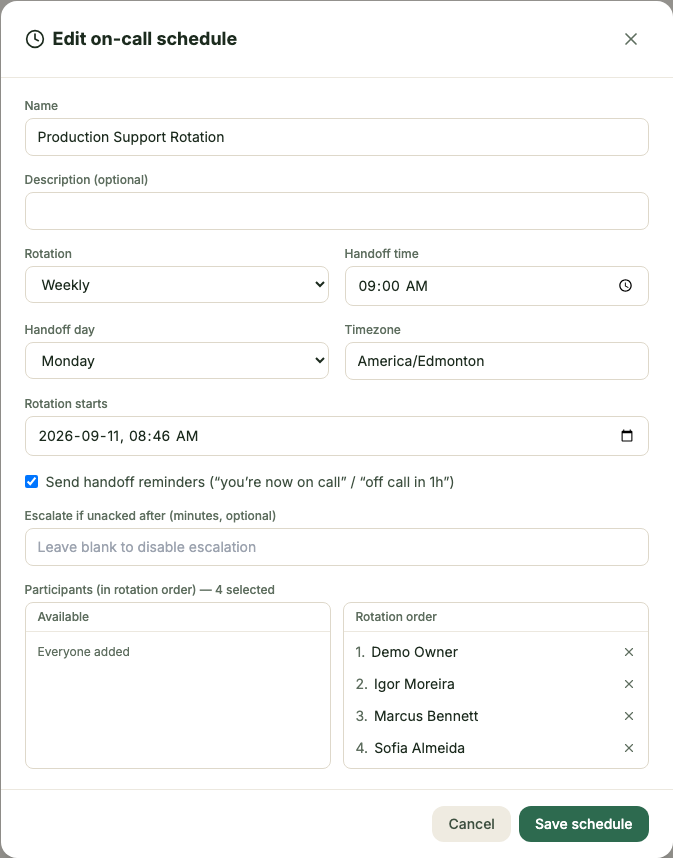
Three steps. Zero new habits.
Build the rotation
A timezone, a daily or weekly cadence, a handoff time, and the order people take it in. Managers override any window; employees swap with a teammate directly.
Route the alerts
Point a monitoring tool at a webhook or one inbound email address. A rule matches the payload, then opens or closes an alert with the title and priority you set.
Escalate, then pay for it
No acknowledgement in time, and TimeLeaf pages the next person. Standby hours and hours actually worked both land in the hours report, ready for payroll.
Everything in the box.
- Daily or weekly rotations, timezone-aware handoffs
- Manager overrides and employee-initiated swaps
- Webhook and email alert intake, HMAC-signed
- Rule-based routing: match, template, create or close
- Escalation if nobody acknowledges in time
- Skips anyone on approved leave or over their overtime cap
- SMS, email and in-app notification on every page
- Standby and active hours reported for payroll
Stop paging the wrong person.
One rotation, and TimeLeaf knows who’s up, who’s covering, and what to pay them for it.
Start free trial14-day free trial · Live in 30 minutes