Put your AI on the roster. Nothing moves until you tap yes.
Connect Claude, or any AI assistant that works with MCP, using your own TimeLeaf login. Then ask it what you would otherwise dig out of five screens: who’s covering Saturday, who’s on call tonight, who’s checked in at the site, who’s out next week. When something needs fixing, ask it to fix it. It comes back as one card to approve, not five jobs to do yourself.
Included on Business and Enterprise. Answers need only a normal connection. Writes are off by default: email [email protected] and we’ll switch them on for your workspace. Opening overtime offers also needs the Overtime broadcasting add-on.
Three steps. Zero new habits.
Connect it as you
Point Claude, or any MCP-compatible assistant, at TimeLeaf. You sign in with your own login and pick what it may see and what it may propose, on a normal consent screen. Nothing to install, no shared passwords, and it never sees more than you can.
Ask instead of checking
Who’s short on Saturday? Who’s on call right now? Who has checked in at the site? Who’s off next week, and does it clash with a blackout? It reads the live schedule and answers in seconds. It can also draft a roster that fills your gaps, or rank who could step in if someone calls in sick, without changing a thing.
Approve the one card it sends you
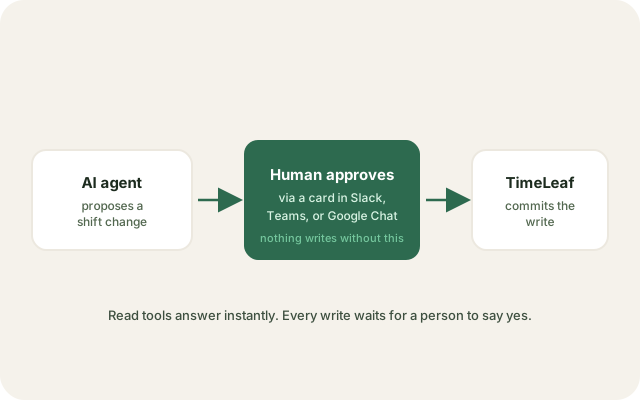
Tell it to make those assignments, offer a shift out, open an overtime opportunity, decide a leave request, or message the crew. It writes nothing itself. It sends you one card in Slack, Teams or Google Chat, and the change happens when you tap approve. Nobody else can tap it for you, and it expires in 15 minutes if you don’t.
Everything in the box.
- Claude or any MCP-compatible assistant, signed in as you with the access you choose
- Who is scheduled and which roles are short, for any dates
- Who is on call right now, and who takes over next
- Who has checked in at which job site today
- Approved leave and blackout clashes for your team
- One person at a glance: contract, roles, hours this period, time bank
- A draft roster for the week, and a ranked stand-in list if someone drops out, without writing anything
- Opt-in writes: assign shifts, offer a shift out, open overtime, decide leave, message people. Each one waits for your tap in Slack, Teams or Google Chat.
Stop being the one who checks everything.
Ask the question, get the answer, tap approve. Your AI does the legwork. The decision is still yours.
Start free trial14-day free trial · Live in 30 minutes